操作系统:
root@ab:/tmp# cat /etc/os-release
PRETTY_NAME="Ubuntu 22.04.5 LTS"
NAME="Ubuntu"
VERSION_ID="22.04"
VERSION="22.04.5 LTS (Jammy Jellyfish)"
VERSION_CODENAME=jammy
ID=ubuntu
ID_LIKE=debian
HOME_URL="https://www.ubuntu.com/"
SUPPORT_URL="https://help.ubuntu.com/"
BUG_REPORT_URL="https://bugs.launchpad.net/ubuntu/"
PRIVACY_POLICY_URL="https://www.ubuntu.com/legal/terms-and-policies/privacy-policy"
UBUNTU_CODENAME=jammy
root@ab:/tmp# uname -a
Linux ab 5.15.0-179-generic #189-Ubuntu SMP Tue May 5 18:20:56 UTC 2026 x86_64 x86_64 x86_64 GNU/Linux
EMQX版本
sysdescr  : EMQX
version   : 5.8.9
datetime  : 2026-06-26T07:07:59.060240820+00:00
uptime    : 1 hours, 11 minutes, 38 seconds
安装步骤:
curl -s https://assets.emqx.com/scripts/install-emqx-deb.sh | sudo bash
apt update && apt install emqx=5.8.9
重现步骤:
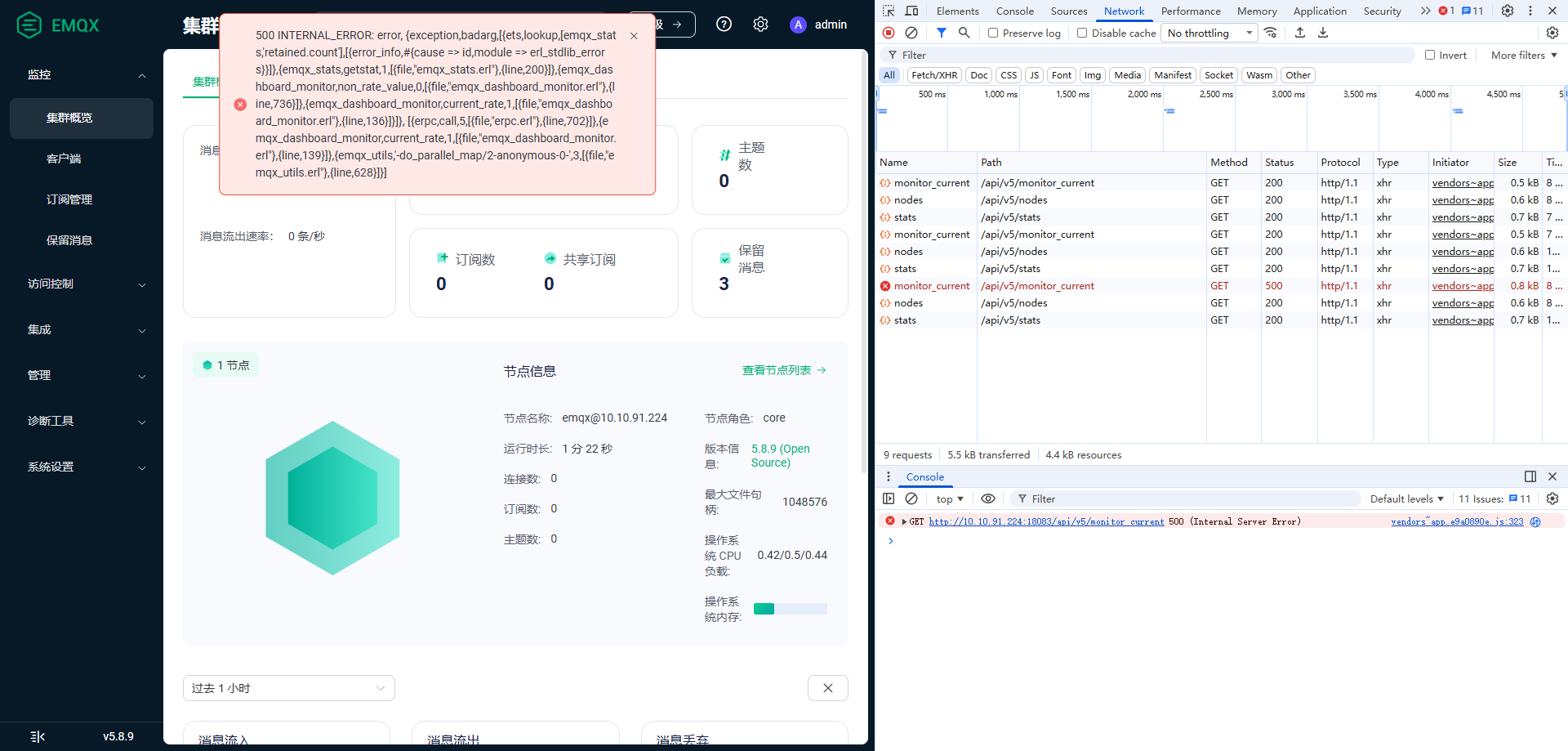
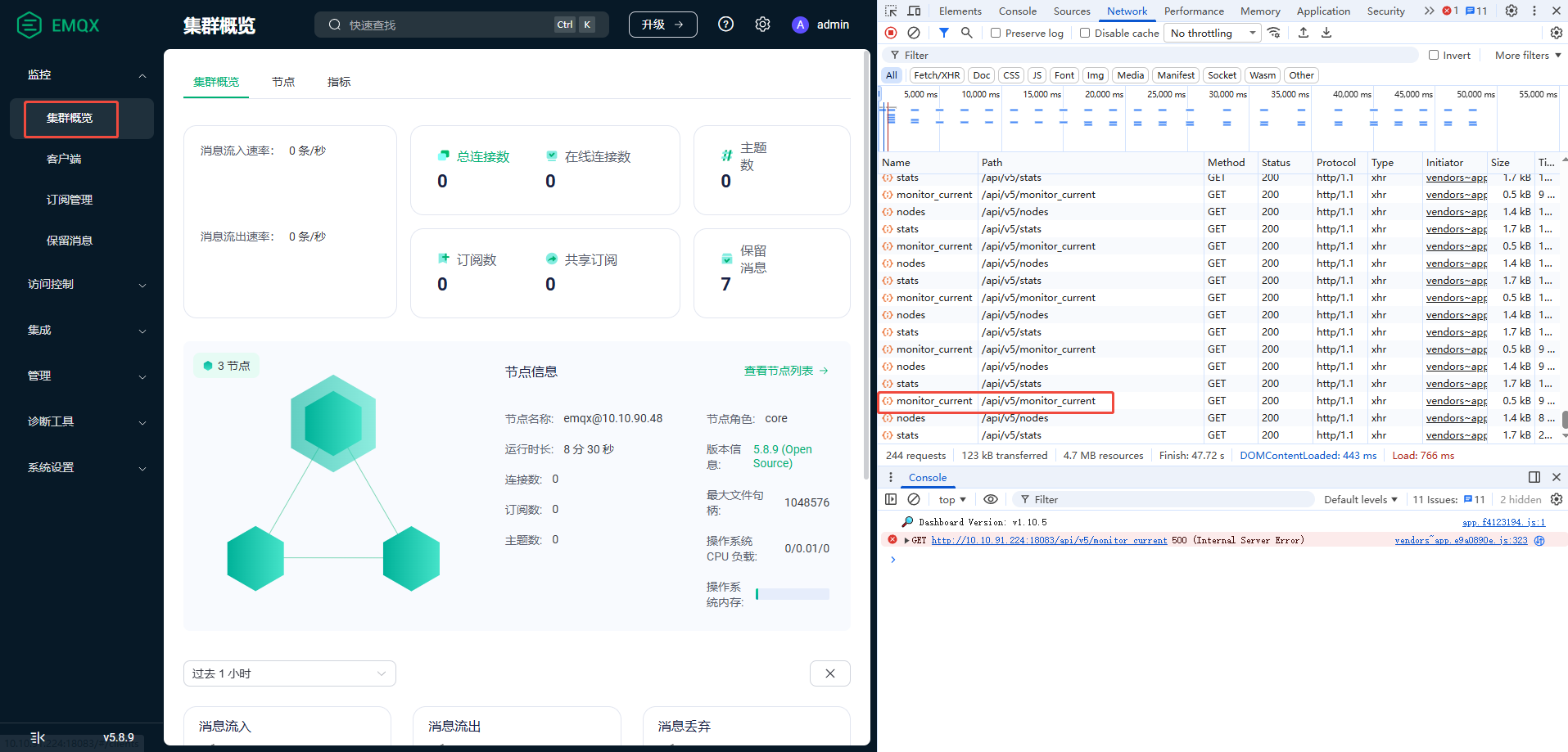
初始化三个独立的emqx节点,然后通过emqx_ctl cluster join命令组建集群,在给集群新增第一个节点或者第二个节点时有很大几率触发报错:
- dashboard会有
500 INTERNAL_ERROR: error提示框 - chrome console会有
GET http://10.10.91.224:18083/api/v5/monitor_current 500 (Internal Server Error)错误消息 - EMQX日志里面会有错误日志.
- 但
emqx_ctl cluster status命令反馈的集群状态是正常的.
仅修改了/etc/emqx/emqx.conf配置文件,其他文件未做变更
listeners {
  ssl {
    default {
      enabled = false
    }
  }
  tcp {
    default {
      acceptors = 16
      access_rules = [
        "allow all"
      ]
      bind = "0.0.0.0:1883"
      enable = true
      enable_authn = true
      max_conn_rate = infinity
      max_connections = infinity
      mountpoint = ""
      proxy_protocol = true
      proxy_protocol_timeout = "3s"
      tcp_options {
        active_n = 100
        backlog = 1024
        buffer = "4KB"
        high_watermark = "1MB"
        keepalive = none
        nodelay = true
        nolinger = false
        reuseaddr = true
        send_timeout = "15s"
        send_timeout_close = true
      }
      zone = default
    }
  }
  ws {
    default {
      enabled = false
    }
  }
  wss {
    default {
      enabled = false
    }
  }
}

node {
  # modify to node ip
  name = "emqx@10.10.91.224"
  cookie = "4yiulncsRnx2iseQnemyxrg"
  data_dir = "/var/lib/emqx"
}

cluster {
  name = "emqx"
  discovery_strategy  =  manual
}

dashboard {
    listeners {
      http {
        bind = "18083"
      }
    }
    swagger_support = false
    default_username = "admin"
    default_password = "3nGkQ9QwEGJyDKi"
}

authentication = [
  {
    backend = built_in_database
    mechanism = password_based
    password_hash_algorithm {name = sha256, salt_position = suffix}
    user_id_type = username
    bootstrap_file = "${EMQX_ETC_DIR}/auth-built-in-db-bootstrap.csv"
    bootstrap_type = "plain"
  }
]
authorization {
  cache {
    enable = true
    excludes = []
    max_size = 32
    ttl = "10m"
  }
  deny_action = ignore
  no_match = allow
  sources = [
    {
      enable = true
      path = "${EMQX_ETC_DIR}/acl.conf"
      type = file
    }
  ]
}
log {
  console {
    enable = false
  }
  file {
    default {
      enable = true
      formatter = json
      level = warning
      path = "${EMQX_LOG_DIR}/emqx.log"
      payload_encode = text
      rotation_count = 10
      rotation_size = "50MB"
      time_offset = system
      timestamp_format = auto
    }
  }
  throttling {
    time_window = "1m"
  }
}
EMQX错误日志:
{"time":1782463084413336,"level":"warning","msg":"dashboard_monitor_error","stacktrace":["{gen_server,call,3,[{file,\"gen_server.erl\"},{line,419}]}","{emqx_dashboard_monitor,current_rate,1,[{file,\"emqx_dashboard_monitor.erl\"},{line,126}]}","{erpc,execute_call,4,[{file,\"erpc.erl\"},{line,589}]}"],"tag":"DASHBOARD","reason":"{noproc,{gen_server,call,[emqx_dashboard_monitor,current_rate,5000]}}","pid":"<66169.3498.0>","line":129}
{"time":1782463084409196,"level":"warning","exception":"error","stacktrace":["{erpc,call,5,[{file,\"erpc.erl\"},{line,702}]}","{emqx_dashboard_monitor,current_rate,1,[{file,\"emqx_dashboard_monitor.erl\"},{line,139}]}","{emqx_utils,'-do_parallel_map/2-anonymous-0-',3,[{file,\"emqx_utils.erl\"},{line,628}]}"],"path":"/monitor_current","reason":"{exception,badarg,[{ets,lookup,[emqx_stats,'retained.count'],[{error_info,#{cause => id,module => erl_stdlib_errors}}]},{emqx_stats,getstat,1,[{file,\"emqx_stats.erl\"},{line,200}]},{emqx_dashboard_monitor,non_rate_value,0,[{file,\"emqx_dashboard_monitor.erl\"},{line,736}]},{emqx_dashboard_monitor,current_rate,1,[{file,\"emqx_dashboard_monitor.erl\"},{line,136}]}]}","pid":"<0.3762.0>","line":200}