
ExHooks 断开连接一段时间后无法重连,在后台开关或删除返回 400

环境

  • EMQX 版本: v5.10.0,v5.10.1
  • 操作系统版本:CentOS Linux release 7.9.2009

重现此问题的步骤

  1. ExHook 能正常处理
  2. ExHook 调用的服务在更新或者异常断开一段时间(大概5分钟以上)
  3. ExHook 不会重连无法开关,也无法删除,调用的服务即使恢复正常也不会重试。

预期行为

ExHook 能够重连

实际行为

ExHook 完全无法控制,除非重启整个 EMQX

这个在 5.8 以前的版本没有出现过

请求信息
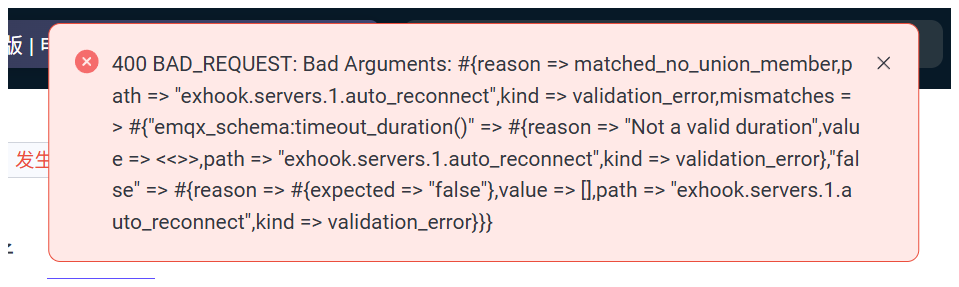
请求内容:
{“auto_reconnect”:“”,“enable”:false,“failed_action”:“deny”,“name”:“IOT”,“pool_size”:16,“request_timeout”:“5s”,“ssl”:{“ciphers”:,“depth”:10,“enable”:false,“hibernate_after”:“5s”,“log_level”:“notice”,“middlebox_comp_mode”:true,“reuse_sessions”:true,“secure_renegotiate”:true,“verify”:“verify_peer”,“versions”:[“tlsv1.3”,“tlsv1.2”]},“url”:“http://172.16.1.150:9001”}

响应消息:
Bad Arguments: #{reason => matched_no_union_member,path => “exhook.servers.1.auto_reconnect”,kind => validation_error,mismatches => #{“emqx_schema:timeout_duration()” => #{reason => “Not a valid duration”,value => <<>>,path => “exhook.servers.1.auto_reconnect”,kind => validation_error},“false” => #{reason => #{expected => “false”},value => ,path => “exhook.servers.1.auto_reconnect”,kind => validation_error}}}
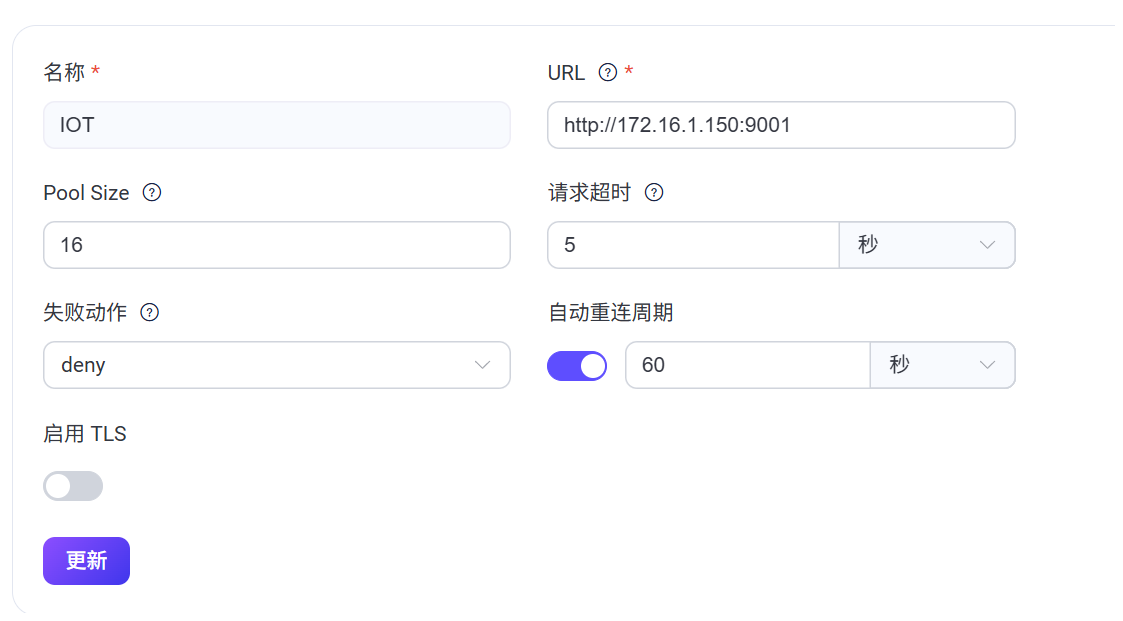
这个错是说auto_reconnect配置的值无效,不能这么配成空,比如 5s 这样就是ok的


这个是配置信息,我没有做任何修改。

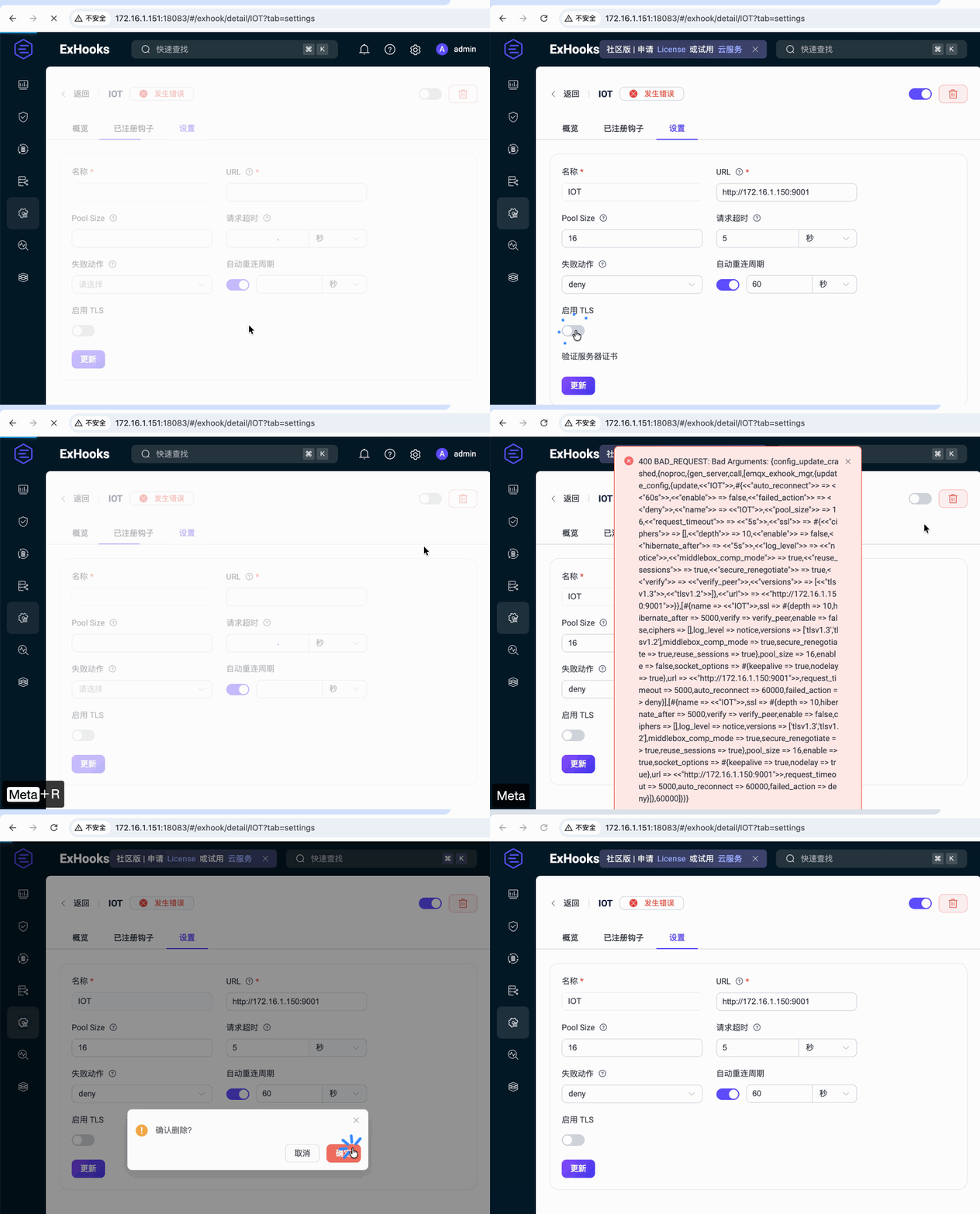
你好,这个问题今天又遇到了,这是录屏。
能帮忙看看是哪里没有设置对吗 @zhongwencool

PixPin_2025-12-03_17-19-50

你录屏里面的报错,和前面提到的错不是同一个。
录屏是说有exhook 的 manager 进程找不了。
能传一下 emqx 的完整日志,他应该在前面就有error 的报错才对。

这是完整日志,应该就在就在这两天的,您看一下。

emqx_log.tar.gz (260.6 KB)

你这个问题非常的严重:
1.

2025-09-04T00:07:19.281248+08:00 [error] Supervisor: {local,disk_log_sup}. Context: child_terminated. Reason: {{failed,{error,{file_error,"/opt/emqx/data/mnesia/emqx@docker.emqx.dev/LATEST.LOG",enospc}}},[{disk_log,reopen,3}]}. Offender: id=disk_log,pid=<0.3575.0>.

enospc 说明你挂载的磁盘 data 目录,磁盘已经满了,写不进去了。
这个是直接原因,导致启动时大量的 crash。功能也是大部分不正常。

2025-09-11T10:06:00.652913+08:00 [warning] msg: long_schedule, info: [{timeout,410},{in,undefined},{out,undefined}], procinfo: [{pid,<0.635494.0>},{memory,13816},{total_heap_size,1597},{heap_size,610},{stack_size,15},{min_heap_size,233},{proc_lib_initial_call,{cowboy_clear,connection_process,['Argument__1','Argument__2','Argument__3','Argument__4']}},{initial_call,{proc_lib,init_p,5}},{current_stacktrace,[{cowboy_http,loop,1,[{file,"cowboy_http.erl"},{line,240}]},{proc_lib,init_p_do_apply,3,[{file,"proc_lib.erl"},{line,329}]}]},{registered_name,[]},{status,waiting},{message_queue_len,0},{group_leader,<0.3794.0>},{priority,normal},{trap_exit,true},{reductions,1517},{last_calls,false},{catchlevel,1},{trace,0},{suspending,[]},{sequential_trace_token,[]},{error_handler,error_handler}]
2025-09-19T16:39:21.121886+08:00 [warning] msg: alarm_is_activated, message: <<"74.24% mem usage">>, name: high_system_memory_usage

high_system_memory_usage long_schedule 是 cpu 不足了,你需要多分配 CPU 资源。

当务之急就是解决这个 CPU 不足,磁盘空间不足,然后重启,问题应该就解决了。